The place where random ideas get written down and lost in time.
2025-11-25 - Automated PA Announcement on the NCRy
Category DEVThe NCRy train could use some kind of automation in their PA announcement system. Currently, the passenger train relies on a volunteer manning the PA system and following some kind of ad-hoc script. This screams for automation -- pre-recorded messages could be announced on the PA system at specific points in the train’s route. As with most automation, it should be supplementary and a PA volunteer should be able to take over at any moment, or just enable the system temporarily when they need a break. Consider this document to be a design doc / proposal document.
I think Curt and I had discussed that about 10 years ago -- back in 2016 I had sent a proposal to Jim on how to create a dashboard that could display the location of each train. This proposal isn’t very different, just updated to what is now ubiquitous tech.
If I had to build this today with current tech, I’d simply use an Android smart phone or tablet with a custom-made Android app:
- Use the phone’s GPS to get the location of the train.
- It may or may not be necessary to have a SIM for internet access to speed up the initial-fix problem (a.k.a. Assisted GNSS).
- Use the phone’s storage to record pre-recorded messages, and then play them back when the phone reaches pre-recorded GPS positions.
- We may want to have these be specific to the train direction or work both ways, and they can be set up with a distance match. That’s basically a crude geofencing solution.
- There can be multiple “tracks” that switch pre-recorded messages/locations for different kinds of events (TOL, beer train, charter, regular w-e train, etc).
Rather than think in terms of GPS position, my suggestion is that we convert GPS positions into a milepost (MP) number. That’s more familiar with everyone involved on the railroad.
Thus a “voice track” is actually a succession of “voice segments” -- each segment is a snippet of voice recording, with an MP interval in which it plays, and optionally a direction.
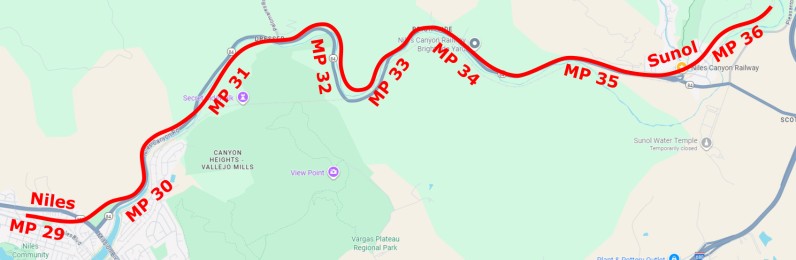
For example a “brightside” segment could have MP 33.5~34.5 -- it would start playing at MP 34.5 when westbound from Sunol, or at MP 33.5 when eastbound from Niles, or right away if the track playback is activated within the yard.
Two segments could have the same milepost range if they have different direction flags. It's useful to record something like “look at this landmark on the left” vs “look on the right” depending on the direction of travel -- which is always either eastbound vs westbound.
Usage
The tracks would be created by having a simple recording mode:
- Engage a recording mode before the train leaves.
- Let the PA person just talk into a mic, and record stuff with the location of where it started. Each recording is a succession of segments with a few minutes of voice and their associated start position.
- Option 1: Manual recording mode.
- The PA person pushes a button to denote when the start and stop recording each segment.
- Option 2: Automated recording.
- Let the system automatically detect pauses and create segments.
- In a post-edit phase, segments can be altered to re-record the voice, or change their milepost range (i.e. adjust geofencing parameters), and/or limit them to a specific direction.
- For the first segment, we could decide whether it plays immediately or when the train starts moving or reaches a specific MP (e.g. the end of the platform at Sunol).
Playback mode:
- A conductor simply selects the appropriate track to play.
- If the first segment is set to play automation on train motion, then there’s nothing else to do.
- If the train is already en route when we start playing, the program should just compute the current MP and start playing at the matching segment if any. That lets a real PA announcer take a break by just starting playing a track at any time.
- The screen should let the PA person change segments -- force going previous or next, or pause/resume.
Hardware Choice
Hardware wise, the easiest is a smart phone or a tablet.
Example of an adequate tablet: Samsung Galaxy Tab A9+ Plus, 11” screen, https://amzn.to/4jA4v0J, around $200. This has an audio jack.
Most modern smart phones or tablets don’t have an audio jack anymore. That’s not a problem as we can use an USB C audio/power splitter like this $15 https://amzn.to/48dWSsn.
The audio jack on phones is always a 4-poles TRRS. There are splitters to get 2 3-poles jacks for headphones vs microphones such as this $8 https://amzn.to/43UBbfQ.
The alternative is to use a bluetooth adapter for the audio in/out. For this application, I think a wired setup would be more reliable and less troublesome.
The nice thing about a smart phone or tablet is that it integrates all that we need: GPS for position, audio in/out, “disk” storage for audio files, and a screen for control. A simple good Android cell phone like a Pixel in the $150 range will do just fine as we don’t need a lot of CPU here, and for a tablet the price range starts at $200 like the Samsung listed above.
Note that smart phones or tablets really are the same thing with only the screen size as the difference. A smart phone can be fairly compact. However here we could benefit from the larger screen size of a tablet, which may allow for a larger easier to read UI for our senior volunteers.
Another hardware choice is to use a small laptop like those I use for the Randall Museum Model Railroad automation -- something like a Lenovo T480s in the $150 range, or maybe a Lenovo Yoga to benefit from a folding touch screen. At 14”, these are still fairly compact. However these don’t have a GPS unit, we need something external such as a USB GPS receiver (in the $15-$30 range). Most of these have a USB cable which allows placing them near a window for better GPS reception.
A hardware analysis would not be complete without estimating how many units we need.
The thing is that we don’t really need to have more than one -- there’s always a single PA car at a given time on the mainline. Conductors or PA volunteers can just carry and set up that phone when they set up the train.
One can argue that PA announcements are not critical (they can always be operated by a volunteer after all) thus this doesn’t even need a strong backup solution.
Hardware-wise, I always aim to be scrappy in my choices. I’ve gotten my share of snarky comments at Randall for not using the latest laptop or tablet hype -- especially from Apple users who don’t seem to understand that a device can work adequately even when it doesn’t cost an arm and a leg. There are a ton of absolutely crappy Android phones and tablets out there at ridiculous prices, but there are also a lot of good options at moderate prices. The task at hand does not require a ton of resources, and using the latest hype hardware would just be a waste of money. Instead, focus on a reliable brand like Pixel, Samsung, or Lenovo that will have good quality for a fairly long period of time.
Software Choice
That seems like a fairly straightforward piece of custom software to write.
For an Android device, obviously the software would be an Android app in Kotlin that I would then publish via the Google Play store. Makes it easier to load and update on the target device. For a laptop, I’d likely also target a Kotlin app and run it in kiosk mode under Debian Linux -- that way we have better control of the OS, e.g. we don’t risk having e.g. a mandatory Windows update whilst the train is operating, and we have less of an ambulatory security risk.
My usual way to write custom software is to build it in phases, starting with an MVP (minimum viable product), then add features as things progress. E.g. to get started, we don’t even need to handle recording in that software. Things can be recorded offline, edited in e.g. Audacity, and then imported on the device as audio files.
One obvious choice would be to load/save the audio files from an external SDCard. That would allow to easily swap them or have backups. That said if the device has wifi or some cell connection, using something like Google Drive or Dropbox as the exchange medium seems a lot easier. The APIs to deal with this on Android are fairly straightforward.
Trains Dashboard
There’s an obvious corollary offshoot project from this design.
Back in 2016 I sent a proposal to Jim on how to create a dashboard that could display the location of each train -- basically each train would have had a cell phone on board sending their GPS position to some server, which we’d collect and display that on a web site, which can be shown on a screen e.g. at the Sunol station, etc.
Well, it turns out that if the proposal above were implemented, one would have a GPS-enabled device on the current passenger train on the mainline (since it would necessarily have the PA car in service). We just need the one smart phone/tablet to have a SIM card and a cell phone line, which can be fairly cheap using some kind of data-only MVNO plan (the so-called “tablet only” plans, IIRC we’re talking less than $200/yr these days). The device on the train just needs to output the known MP location to some server, and a display can then pick that up in the station if it has internet/wifi.