The place where random ideas get written down and lost in time.
2025-12-27 - Lenovo T480s: i5 vs i7 CPU Comparison
Category DEVI have a number of Lenovo T480s and T460s laptops, with either the Core-i5 or the Core-i7 CPUs. I know for a fact that when looking at eBay pricings, for example, the i7 laptops always fetch a higher value because they have a perceived better performance. Yet, in a day to day usage, I don’t really notice a difference between both. So, is the i7 “value added” real or hype?
Let’s look in detail at the T480s and these 2 flavors of CPUs:
- i5-8350U, Intel specifications:
- 14 nm, 4 cores, 8 threads,
- freq base 1.7 GHz, turbo 3.60 GHz, 6 MB cache, 4 GT/s bus speed,
- TDP 15W (10W @ 800 MHz → 25 W @ 1.90 GHz),
- DDR4-2400 @ 37.5 GB/s on 2 lanes max, UHD Graphics 620 @ 300 MHz → 1.10 GHz
- i7-8650U, Intel specifications:
- 14 nm, 4 cores, 8 threads,
- freq base 1.9 GHz, turbo 4.20 GHz, 8 MB cache, 4 GT/s bus speed,
- TDP 15W (10W @ 800 MHz → 25 W @ 2.10 GHz),
- DDR4-2400 @ 37.5 GB/s on 2 lanes max, UHD Graphics 620 @ 300 MHz → 1.10 GHz
The major difference between both is a 12% speed increase in the base clock frequency, and a 33% cache increase. I do not think these numbers match my actual usage perception of both machines -- they don’t feel anywhere “12 to 33% faster”.
The “marketing perception” is also that the “i5 is a great all-rounder for mainstream users, while the i7 offers more power for demanding tasks like video editing or high-end gaming” (sic). I call that dubious marketing (a.k.a “BS”). That statement is likely true for the desktop processors, but that’s not what we have here. They both have 4 cores so a i7 is not going to be able to run more tasks in parallel than an i5.
It’s important to note that these are “U” model CPUs. In Intel terminology, this means they are “mobile” (laptop) variants mostly constrained by their power dissipation (a.k.a TDP, or “Thermal Design Power”). Both CPUs have the 25W TDP envelope. The reality is that there are only so many transistors in a 14 nm die that can run at the same time and not exceed that 25 W envelope. You’re essentially limited by how much heat you can get out of these CPUs with the weak cooling architecture.
Let’s look at this from another angle: reported user benchmarks show us a reported 1%-2% increase in actual benchmarks.
Benchmarks are the way to go, but these above were a bit abstract. I thus decided to run my own benchmarks based on stuff I actually do with these laptops. This includes compiling a Flutter web app in Dart, compiling a fairly large ESP32 C++ project, compiling fairly large Java and Kotlin projects, and using DaVinci Resolve to stabilize, render, and compute Fusion VFX on one of my train videos. You know, the usual stuff one does on a laptop on a daily basis.
Here are the results:
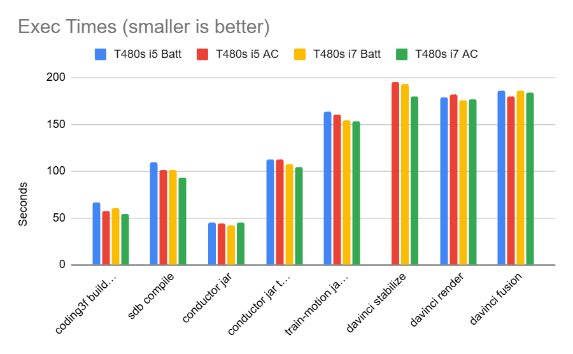
We can see that all the results are extremely close. All these results are “best of 3” for each test (I screwed up the DaVinci stabilization test on the i5 on battery and I got too lazy to rerun it again). I did the tests using both the on-AC vs on-battery mode, with the default “balanced” Windows 10 battery settings.
And thus, indeed, the i7 is slightly faster than the i5, and the AC mode is slightly faster than the battery mode. But how much is “slightly”?
I want actual numbers, so here’s a graph computing the best of each i7 vs the best of each i5 result:
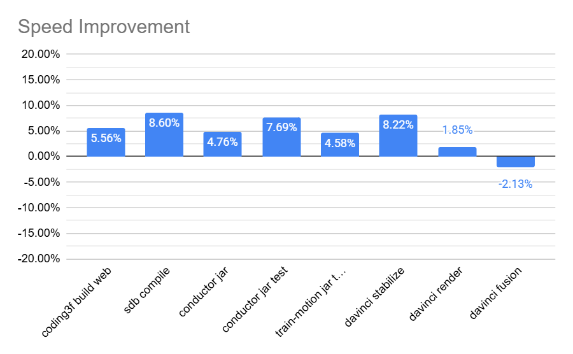
So there I have it: the i7 provides a 5-8% improvement over the i5 for my daily development tasks. I have to say it doesn’t feel like a tangible difference.